
Rust支持系统编程,可以编写内核程序,本次实验是使用Rust编写内核程序,在裸机上运行并打印一个爱心。
项目结构:1
2
3
4
5
6
7
8
9
10
11.
├── build.rs
├── Cargo.lock
├── Cargo.toml
├── kernel
│ ├── Cargo.toml
│ └── src
│ └── main.rs
├── rust-toolchain.toml
├── src
│ └── main.rs
build.rs是一个构建脚本,用于生成镜像文件,代码如下。1
2
3
4
5
6
7
8
9
10
11
12
13
14
15
16
17
18
19
20
21
22
23
24
25use std::path::PathBuf;
fn main() {
// set by cargo, build scripts should use this directory for output files
let out_dir = PathBuf::from(std::env::var_os("OUT_DIR").unwrap());
// set by cargo's artifact dependency feature, see
// https://doc.rust-lang.org/nightly/cargo/reference/unstable.html#artifact-dependencies
let kernel = PathBuf::from(std::env::var_os("CARGO_BIN_FILE_KERNEL_kernel").unwrap());
// create an UEFI disk image (optional)
let uefi_path = out_dir.join("uefi.img");
bootloader::UefiBoot::new(&kernel)
.create_disk_image(&uefi_path)
.unwrap();
// create a BIOS disk image
let bios_path = out_dir.join("bios.img");
bootloader::BiosBoot::new(&kernel)
.create_disk_image(&bios_path)
.unwrap();
// pass the disk image paths as env variables to the
println!("cargo:rustc-env=UEFI_PATH={}", uefi_path.display());
println!("cargo:rustc-env=BIOS_PATH={}", bios_path.display());
}
Cargo.toml文件如下:1
2
3
4
5
6
7
8
9
10
11
12
13
14
15[workspace]
resolver = "3"
members = ["kernel"]
[package]
name = "test_bootloader"
version = "0.1.0"
edition = "2024"
[dependencies]
ovmf-prebuilt = "0.2.5"
[build-dependencies]
kernel = { path = "kernel", artifact = "bin", target = "x86_64-unknown-none" }
bootloader = "0.11.13"
在rust-toolchain.toml中配置编译器的版本,如下:1
2
3[toolchain]
channel = "nightly"
targets = ["x86_64-unknown-none"]
src\main.rs是一个测试程序,用于启动qemu虚拟机,所以你可能需要安装qemu。1
2
3
4
5
6
7
8
9
10
11
12
13
14
15
16
17
18
19
20
21
22
23
24
25
26
27
28
29
30
31
32
33
34
35
36
37
38
39
40
41
42
43
44
45
46
47
48
49
50
51
52
53
54
55
56
57
58
59
60
61
62
63
64
65
66
67
68
69use ovmf_prebuilt::{Arch, FileType, Prebuilt, Source};
use std::env;
use std::process::{Command, exit};
fn main() {
// read env variables that were set in build script
let uefi_path = env!("UEFI_PATH");
let bios_path = env!("BIOS_PATH");
// parse mode from CLI
let args: Vec<String> = env::args().collect();
let prog = &args[0];
// choose whether to start the UEFI or BIOS image
let uefi = match args.get(1).map(|s| s.to_lowercase()) {
Some(ref s) if s == "uefi" => true,
Some(ref s) if s == "bios" => false,
Some(ref s) if s == "-h" || s == "--help" => {
println!("Usage: {prog} [uefi|bios]");
println!(" uefi - boot using OVMF (UEFI)");
println!(" bios - boot using legacy BIOS");
exit(0);
}
_ => {
eprintln!("Usage: {prog} [uefi|bios]");
exit(1);
}
};
let mut cmd = Command::new("qemu-system-x86_64");
// print serial output to the shell
cmd.arg("-serial").arg("mon:stdio");
// don't display video output
cmd.arg("-display").arg("gtk");
// enable the guest to exit qemu
cmd.arg("-device")
.arg("isa-debug-exit,iobase=0xf4,iosize=0x04");
if uefi {
let prebuilt =
Prebuilt::fetch(Source::LATEST, "target/ovmf").expect("failed to update prebuilt");
let code = prebuilt.get_file(Arch::X64, FileType::Code);
let vars = prebuilt.get_file(Arch::X64, FileType::Vars);
cmd.arg("-drive")
.arg(format!("format=raw,file={uefi_path}"));
cmd.arg("-drive").arg(format!(
"if=pflash,format=raw,unit=0,file={},readonly=on",
code.display()
));
// copy vars and enable rw instead of snapshot if you want to store data (e.g. enroll secure boot keys)
cmd.arg("-drive").arg(format!(
"if=pflash,format=raw,unit=1,file={},snapshot=on",
vars.display()
));
} else {
cmd.arg("-drive")
.arg(format!("format=raw,file={bios_path}"));
}
let mut child = cmd.spawn().expect("failed to start qemu-system-x86_64");
let status = child.wait().expect("failed to wait on qemu");
match status.code().unwrap_or(1) {
0x10 => 0, // success
0x11 => 1, // failure
_ => 2, // unknown fault
};
}
kernel\Cargo.toml文件如下:1
2
3
4
5
6
7
8
9[package]
name = "kernel"
version = "0.1.0"
edition = "2024"
[dependencies]
bootloader_api = "0.11.13"
uart_16550 = "0.4.0"
x86_64 = "0.15.4"
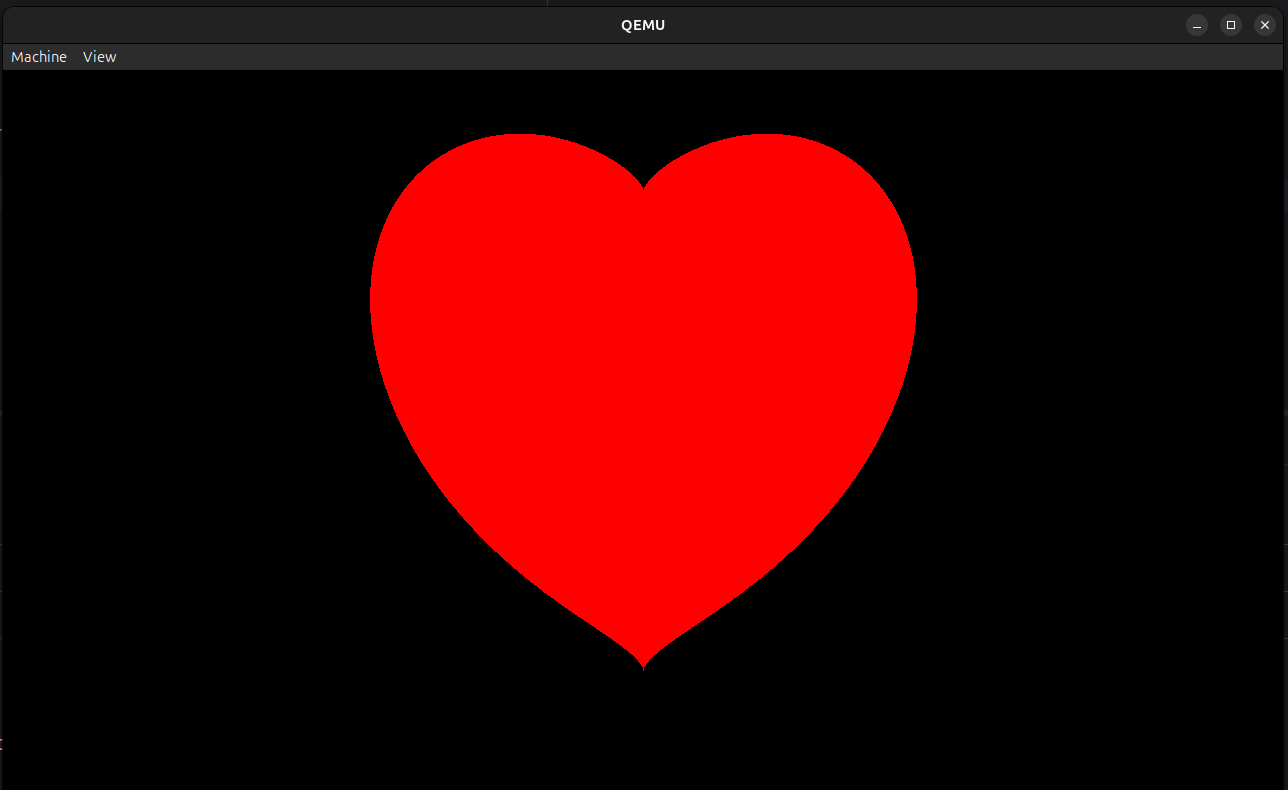
kernel\src\main.rs文件是内核程序,当加载引导程序后,会调用kernel_main函数,我们在kernel_main函数中向屏幕中画一个爱心的图像:1
2
3
4
5
6
7
8
9
10
11
12
13
14
15
16
17
18
19
20
21
22
23
24
25
26
27
28
29
30
31
32
33
34
35
36
37
38
39
40
41
42
43
44
45
46
47
48
49
50
51
52
53
54
55
56
57
58
59
60
61
62
63
64
65
66
67
68
69
70
71
72
73
74
75
76
77
78
79
80
81
use bootloader_api::{BootInfo, entry_point};
use bootloader_api::info::{FrameBuffer, FrameBufferInfo};
use core::fmt::Write;
pub enum QemuExitCode {
Success = 0x10,
Failed = 0x11,
}
pub fn exit_qemu(exit_code: QemuExitCode) -> ! {
use x86_64::instructions::{nop, port::Port};
unsafe {
let mut port = Port::new(0xf4);
port.write(exit_code as u32);
}
loop {
nop();
}
}
pub fn serial(port: u16) -> uart_16550::SerialPort {
let mut port = unsafe { uart_16550::SerialPort::new(port) };
port.init();
port
}
entry_point!(kernel_main);
fn kernel_main(boot_info: &'static mut BootInfo) -> ! {
let mut port = serial(0x3F8);
writeln!(port, "\n=(^.^)= Hello,world!\n").unwrap();
let framebuffer = boot_info.framebuffer.as_mut().unwrap();
draw_heart(framebuffer);
loop {}
}
fn draw_heart(fb: &mut FrameBuffer) {
let info = fb.info();
let cx = info.width as f32 / 2.0;
let cy = info.height as f32 / 2.0;
let size = core::cmp::min(info.width, info.height) as f32 / 3.0;
fb.buffer_mut().fill(0);
for py in 0..info.height {
for px in 0..info.width {
let x = (px as f32 - cx) / size;
let y = (cy - py as f32) / size;
let eq = (x * x + y * y - 1.0) * (x * x + y * y - 1.0) * (x * x + y * y - 1.0) - x * x * y * y * y;
if eq <= 0.0 {
unsafe { put_pixel(fb, info, px, py, 255, 0, 0) };
}
}
}
}
unsafe fn put_pixel(fb: &mut FrameBuffer, info: FrameBufferInfo, x: usize, y: usize, r: u8, g: u8, b: u8) {
let offset = (y * info.stride + x) * info.bytes_per_pixel;
fb.buffer_mut()[offset] = b;
fb.buffer_mut()[offset + 1] = g;
fb.buffer_mut()[offset + 2] = r;
}
fn panic(info: &core::panic::PanicInfo) -> ! {
let _ = writeln!(serial(0x3F8), "PANIC: {info}");
exit_qemu(QemuExitCode::Failed);
}
使用cargo run bios启动测试程序,顺利的话你可以在qemu虚拟机中看到一个爱心。


- 本文作者: killf
- 本文链接: https://www.killf.info/编程语言/Rust/使用Rust编写内核程序/
- 版权声明: 本博客所有文章除特别声明外,均采用 Apache License 2.0 许可协议。转载请注明出处!